
Money-Code

Coding For Online Success

January 4, 2017
by admin
0 comments

Setting up Twitter API keys

I’ve been having some great success with Twitter lately. As I mentioned in my previous posts, I’ve been focusing in on my ‘thick’ sites and moving away from my ‘thin’ sites. While developing that ‘thin’ empire, I was also creating social support for those sites, primarily via Twitter.

Over those years, I have many accounts that have gained a great amount of followers. Some of those followers are what I call ‘low value’ followers, because engagement was low – again, the lameness of thin sites, but some the accounts have great followers associated with them.

I manage all of my Twitter accounts with a great tool – Hootsuite. Depending on your accounts, you may need to opt for the paid version. The streams functionality is vital for me to manage multiple accounts, and view streams based on hashtags for great interaction. Hootsuite also has the ability to schedule posts, etc. It’s a critical tool for me. I literally use it every day.

Even with the power of Hootsuite, it still involves me actually interacting. I wanted to do some automated handling, which I’ll get into over the next few days. But before we get into that, I wanted to make this post about generating Twitter API keys. I often get asked about this, and people do get lost in this. So I wanted to make this reference post first.

Twitter API allows you to connect remotely to do certain tasks with Twitter. You can fetch (read) information or you can post (write) information as a Twitter account. The beauty of this is that you can programmatically post tweets.

The first thing you need to do is log into your Twitter account in your browser, then go to https://apps.twitter.com We are going to create a new app, that will give us the ability to do some things, but during this creation, we will have keys. Keys are basically a password to remotely authenticate our program to communicate with Twitter.

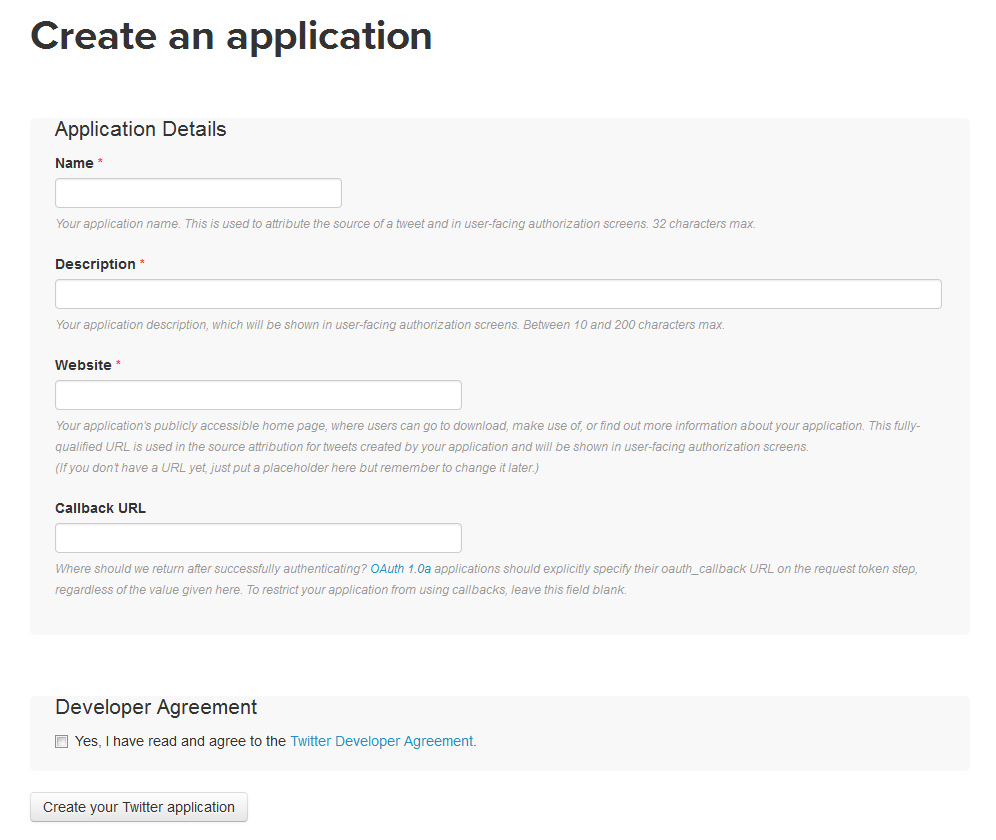
Once you’re at apps.twitter.com you should see a button called “Create New App”. Clicking that you will be shown the following screen:
Setting up Twitter API keys

Fill out the information. Leave ‘Callback URL’ blank, agree to the Developer Agreement and click “Create your Twitter application”.

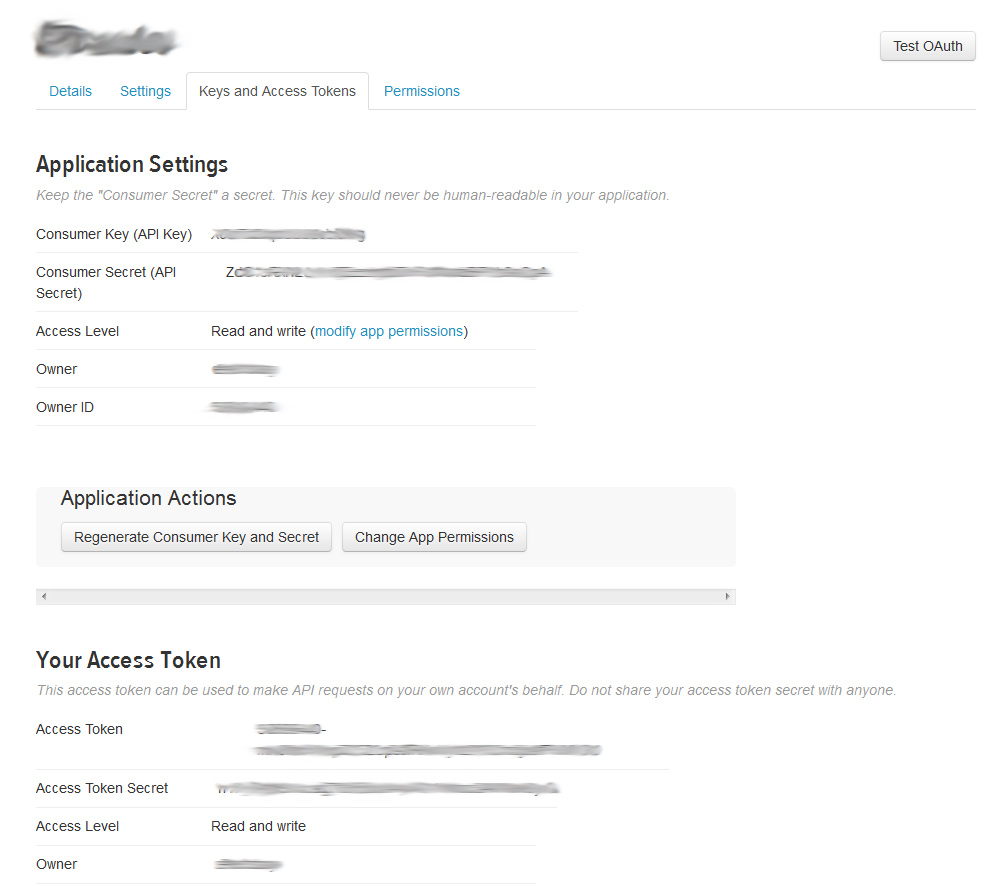
You will next land on the detail screen. Click the “Keys and Access Tokens” tab. You should see something like this:
Setting up Twitter API keys

Now, things that are important. You want to make sure your Access Level is “Read and write”. I believe that is by default, but make sure you check it. If you can’t “write” you can’t “post”. In a secure area in your development you’ll want to copy the Consumer Key (API Key), Consumer Secret (API Secret), Access Token and Access Token Secret. You’ll need all 4 of these to authenticate via oAuth to your program.

I’ll stop here, there will be more to come with what I’m doing and some strategies on how to leverage and drive traffic from Twitter to your web resource. In the meantime, I would start interacting on Twitter and start generating followers.

December 27, 2016
by admin
0 comments

Moving away from thin to thick

As I mentioned in my previous post, over the years, I developed an extensive network of EPN (eBay) sites. I’ve spent countless hours of development working on API calls to provide users with enhanced searches for eBay auctions, but overall, they are what you would call thin affiliate sites. In the eyes of Google, that is bad, and because of that, those sites were punished and removed from the search index.

Luckily, during my network building, I also built community based sites, and have been posting and building content for a long time. Those definitely take more time, but because I tried to stay diversified , those are “thick” and Google loves them. For example, I have one site that is several years old, and has over 2500 posts. THICK!

I remember when I started my affiliate empire, I read the book by Gary Vaynerchuk called Crush It. If you have not read it, I would definitely recommend it. No spoilers here, but the jist – he focuses on 2 big topics that I really took to heart. #1 Be “the” guy of your topic, whatever it might be. So if you have a site about something, try to be the authority. Easy to say, hard to do, but if you keep talking about it, eventually, you’ll get respect in that topic. #2 which I think is the most important – create a community.

#1 is easy to understand, but #2 is much harder. Creating a community is difficult, and the first technique, is to change the focus. Focus on the readers. Make them feel that they are part of your success and struggles. In retail, there is saying, it’s not about selling product, but making customers. You can sell that product once and be done, but if you create a loyal customer, you’ll get many sales. This principle is the same for your site. Once people are invested (emotionally) they’ll keep coming back. They’ll share posts, they’ll send links, etc.

When I think of community, it’s about the “touches”. I need to be about to touch as many people as possible. That usually means social networks. For me, the biggies are Facebook, Instagram, Twitter AND mailing list. Don’t forget that mailing list.. crazy important. Once, you’ve established good content, and a system and consistency with posts, you need to get them to the networks. Nothing new here right? You’ve read that everywhere, and that’s the same old advise you’ll get over and over.

For me, I paid for initial “likes” get the ball rolling. When people see your FB page with 23 likes, it’s hard to get people on board When you have 3000+ likes, it’s an easier sell. Of course, when I pay for likes, I’m talking about via Facebook ads and targeted.  I wanted “real” people that are interested in what I’m doing.

Over the next little while, I’m going to talk about various strategies on keeping those “touches” out there and throw in some code concepts I’m implementing on Twitter right now with a variety of my sites.

In the meantime, I’m going to be migrating away from all of my non-performing thin sites and investing more time and money on the thick. Like I said earlier, 2017 should be interesting!

December 22, 2016
by admin
0 comments

Plans for 2017

So, oddly, I’ve been asked by a few people what Money-Code has been up to recently. I’ve let the site go and completely stopped posting. Did I stop marketing? Nope. Did I stop coding? Nope.

What I have been doing is sitting on my laurels. Over the last few years, I created a pretty impressive network of sites earning passive income. Those sites have been focusing on EPN and Amazon earnings for the most part.  But, I also have been focusing on my community based sites. I don’t call those passive, since I post or work on those daily, and it takes a lot of time and energy, but there is substance there.

Google likes that substance.  Slowly over the years.. all the various Google algorithm changes have been eating away and chipping at my EPN/Amazon sites. All of that work creating RSS and API feeds with enhanced searches of auctions and products is viewed as thin sites and in turn most have been de-indexed.

2016 was a clean up year for me. Instead of grasping at sites, wondering how to fix/improve them, I decided to let them go. It was hard, but I’m moving on from those types of sites and focusing on what I have passion in. Sites that I can spend some time on – from a coding stand point as well as from a community stand point. Creating cookie-cutter sites was fun, but what I don’t like, is being reliant on larger organizations like Google or Facebook determining my fate.

With a community based site, you have that community and the goal is to grow and nurture those followers and in turn they will share, they will click.

In 2017 I will most likely develop 0 sites for marketing. What I’m going to do is work on my community based sites and see where I can go with them.

So where does that leave you? Well, I’m going to really focus on how to build community, and that is what I’m going to share with you. In 2016, I’ve been using some tools and techniques that have really helped. The goal is to get traffic first. Once there is traffic, there is opportunity for monetization.

So.. I’m back!

November 15, 2011
by admin
0 comments

What I’ve Been Up To

I’ve had a few people ask me what I’ve been up to.  Over the last year, I’ve been laying low in regards to Money-Code.com, but I’ve been pretty active in affiliate marketing in general. Granted this past year has been a busy one with my primary business, but every free moment has been devoted to tweaking.

For 2011 I decided to make some major changes in my strategy, and focus on tweaking vs. building. I really believe that a better user experience is the only way around Panda updates and the general ups and downs of traffic. To develop community and loyalty with your users is worth WAY more than the new tools, etc. Panda hit me hard, and I still feel the sting, but thickening sites, and creating loyalty, I’m starting to see some improvement, and I feel that these changes will really shine in 2012.

I have to say that in 2011, I did do some new site development, primarily in Amazon. I’ve had issues with Amazon for years as an affiliate. It’s definitely a hard egg to crack and to see consistent revenue can be challenging. I’ve been working on a few theories and so far they have been paying off nicely.. and more importantly, consistently. I believe in 2012, I’ll put a little more emphasis. Also, on the flip side, my Commission Junction earnings have been dipping. I ended up dropping PopShops, and I haven’t looked back.

It was interesting that Panda changes hurt, and developed a significantly lower amount of sites, yet 2011 will still be a record year for me. Again, keeping a foundation is very important to float you while you develop.

Plans for 2012 include much more Amazon sites, focus on direct advertising, and developing a web application for potential re-sale. I might be developing some mobile solutions for EPN sites as well, that is still in the brainstorming stages.  Oh.. and to blog a little more on Money-Code.com!

March 14, 2011
by admin
0 comments

Great deal on Dell PowerEdge T110 Server!

Great deal on Dell PowerEdge T110 Server!As an programmer / affliate marketer servers are extremely important to me. Sure I do take advantage of HostGator share hosting servers, but usually with quick and dirty web sites. Anything that involves thinking outside of the box will require my own server since there are packages, centralization, globalization of code that I would like to use. I also like to use my own servers for security and managing the traffic that hit my web sites. But, I’m talking production.

I always test my sites and develop my sites on several development servers. Those servers are here in my office and are an extremely valuable asset to my business. I also use servers as file servers. I’m sorta freaky about backups. I love backups. I love incremental backups. For me to maintain these backups, I need to have disk and servers to manage them. So.. you probably get it.. servers are important.

The reason for this post, is that I buy my servers (development and file servers) from Dell. I always wait for specials that they run, and you can get crazy awesome deals for servers. I just was notified about a deal going on right now.

Currently they’re offering a Dell PowerEdge T110 Server with a 24″ ViewSonice Widescreen Black LCD Monitor for only $479. This includes FREE 3-5 day shipping. Not bad at all! This will be a system without a operating system, which is perfect if you’re messing around with Linux, but it would be easy to install Windows if needed. You should be able to upgrade or customize the server directly from Dell, but obviously the price would go up.

Here are the specific details of the offer:

Dell PowerEdge T110 Server with 24″ ViewSonic Widescreen Black LCD Monitor
Intel Xeon X3430 Processor
2GB Memory
250GB Hard Drive
Free 3-5 Day Ground Shipping!

For more information Dell PowerEdge T110 Server with a 24″ ViewSonic Monitor offer for only $479, click here.